Measuring the value
One construction project, from drawings to payment, on one screen: 288 acceptance records accepted, worth zero
On a real project, all 288 acceptance records say "accepted" while the accepted value is zero: 798 quantity links are still the machine's suggestions. Each screen on its own looks right; the break sits between the phases. How much waiting money and rework goes away when the whole project sits on one screen?
When each phase of a project lives in a different place, where do money and questions get stuck?
All it needs is the number of projects, the contract value, the build months and the cost of an hour. Value built per month, drawing questions and status checks are derived from those. Every number is editable.
Derived from the four numbers above (per month, all projects)
Assumptions — click to see and edit every number
Money stuck between phases
Drawing questions to the design consultant
Knowing where a project stands
This is an estimate, not a promise. Line B is the softest — set the two question shares equal and read again. Set every "one screen" number equal to today's and the total goes to zero. An honest model has to be able to.
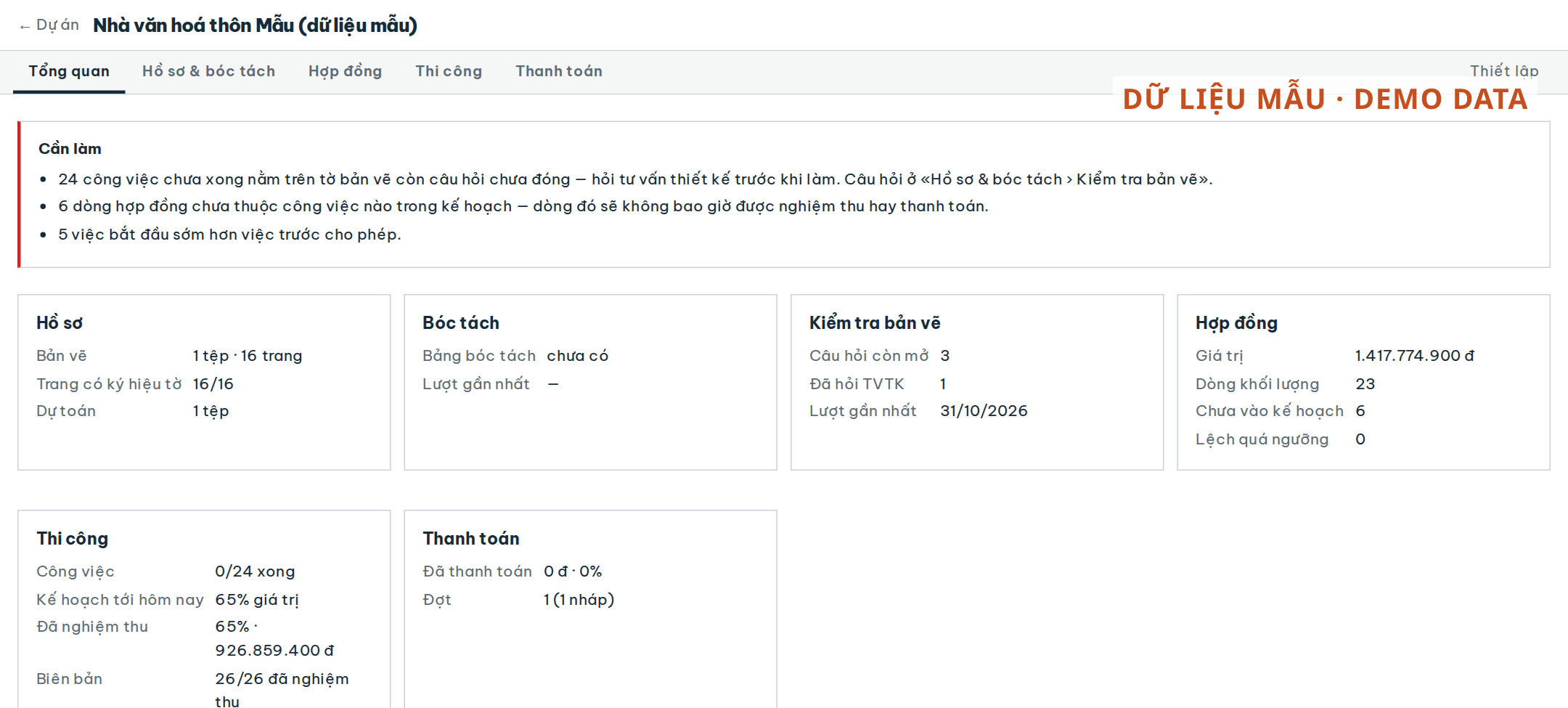
Open the overview of a state-funded restoration project under construction, anonymised. 288 acceptance records, all 288 in the status «Đã nghiệm thu» (accepted). The plan up to today has passed 42% of the contract value. The value accepted, in money: zero.
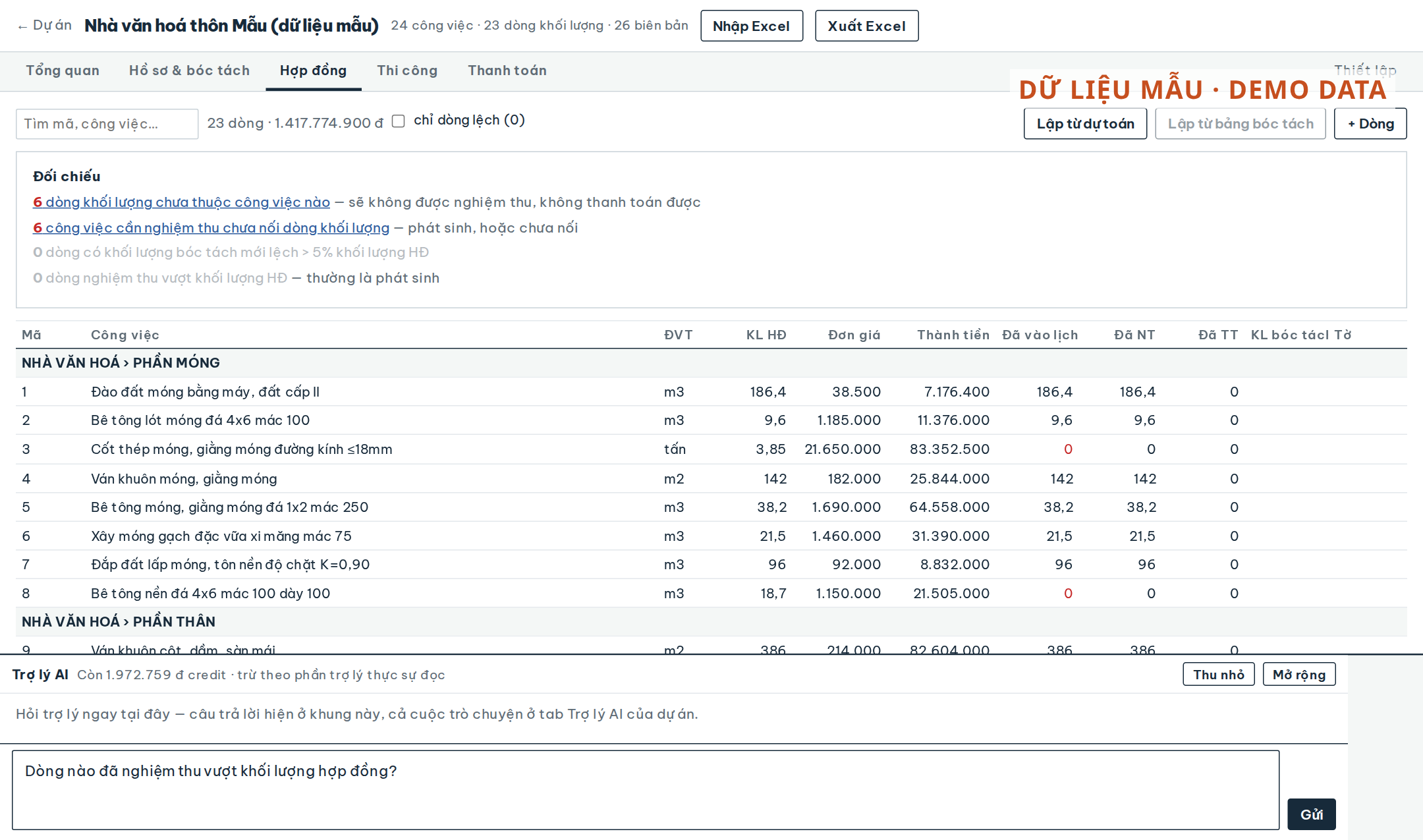
Nobody did anything wrong and the software is not broken. The plan was imported from the engineer's Excel workbook; the machine suggested which job matches which quantity line — 798 such links, and all 798 are still suggestions, confirmed by no one. An acceptance record takes its quantities only from confirmed links, so every record exists and none of them carries money. On the same project, 490 of 784 contract lines belong to no job in the plan — lines that will never be accepted or paid unless someone notices.
Each screen, looked at on its own, looks right: the list of records is complete, the contract table is complete, the plan is complete. The break sits between the screens, and it only shows when the phases are put side by side. This piece asks: when a problem born in one phase is only seen from another, what does it cost — and how much of that goes away when the whole project sits on one screen?
1. What changed
The previous piece told how the diary, the acceptance records and the payment statement are generated from one plan. A project's data already hung on one axis — drawings, estimate, takeoff, contract quantity lines, jobs, diary, acceptance records, payment periods. Only the screens were still split in two. This change joins the screens along that same axis:
- One phase rail on every project: Overview · Documents & takeoff · Contract · Construction (Plan / Diary / Acceptance) · Payment · Settings. Old links still open in the right place.
- «Tổng quan» (Overview): one card per phase — drawing pages, takeoff table, drawing questions still open, contract value, lines not in the plan, lines off tolerance, % planned to date against % accepted, diary days locked, amount paid. At the top sits a «Cần làm» (To do) box, and each line in it corrects the belief behind the problem rather than just reporting a count: "quantity links are still suggestions — a record takes quantities only from confirmed links, so these records are at 0 VND".
- The contract quantity ledger gains a «Đã TT» (paid) column and a «chỉ dòng lệch» (only lines off) filter: takeoff or accepted quantity differing from the contract by more than a percentage — a threshold set per package in Settings, because every client sets it differently.
- Drawing questions have a life: Open → Asked the design consultant → Answered (the answer is recorded) → Resolved or Dismissed, and the questions to the design consultant print as one list.
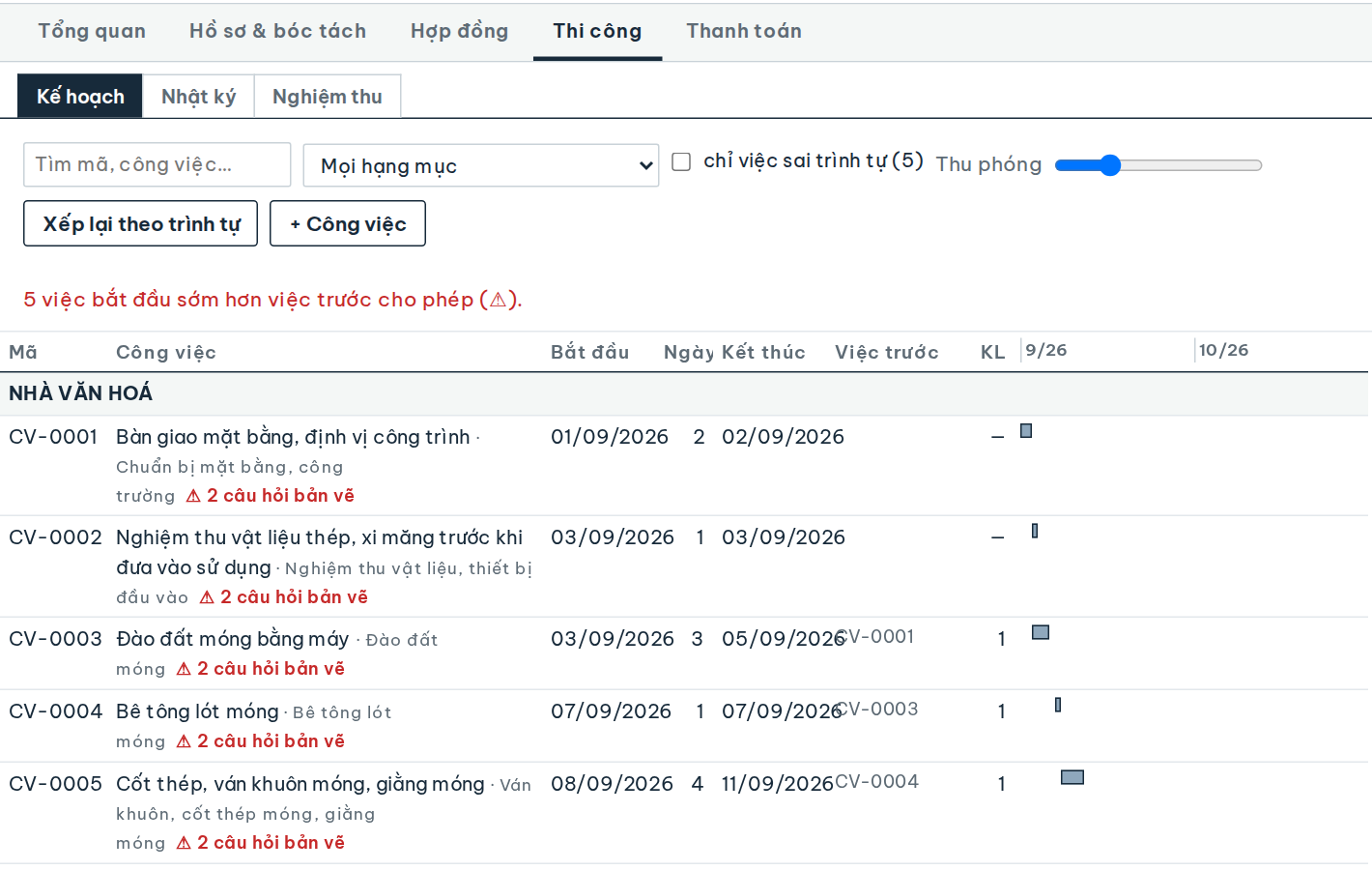
- Questions follow their drawing sheet into construction: jobs, acceptance records and diary days on a sheet with an open question are flagged ⚠. "Drawing no. KC-01" on a job or a record is a link that opens that exact page of the uploaded drawing set.
- The project assistant sits under every tab, knows which tab the user is on and can read every construction tab. "How many" questions are answered from a summary over every row: on the project above, "how many acceptance records" was counted correctly as 288 in one read, for 2,910 VND of credit.
2. The first stream: money waiting between phases
Both leaks above are money already earned that cannot reach a payment period: the part in contract lines no job carries, and the part accepted while its quantity link is still a suggestion. It is not lost for good — sooner or later someone notices. The price is the days the money waits.
How to measure it. Take the last three payment claims and count the items finished in one period that only made it into the next, and why. With a tool that has an overview, count the days from a «Cần làm» line appearing to it going away.
How far to trust it: fair. The stuck share can be counted; the "today" days are the company's own estimate. On the project in the opening, the stuck share is all of the accepted value — the example uses 28% so as not to flatter.
3. The second stream: drawing questions reaching the site before the answer
The drawing check finds places where the general drawing and the detail disagree: footing M1 is 1.2 m on the plan, 1.4 m on the detail. The question goes to the design consultant; the answer comes later. The question lives in one file, the schedule in another — and the crew digs footing M1 to the number they saw first.
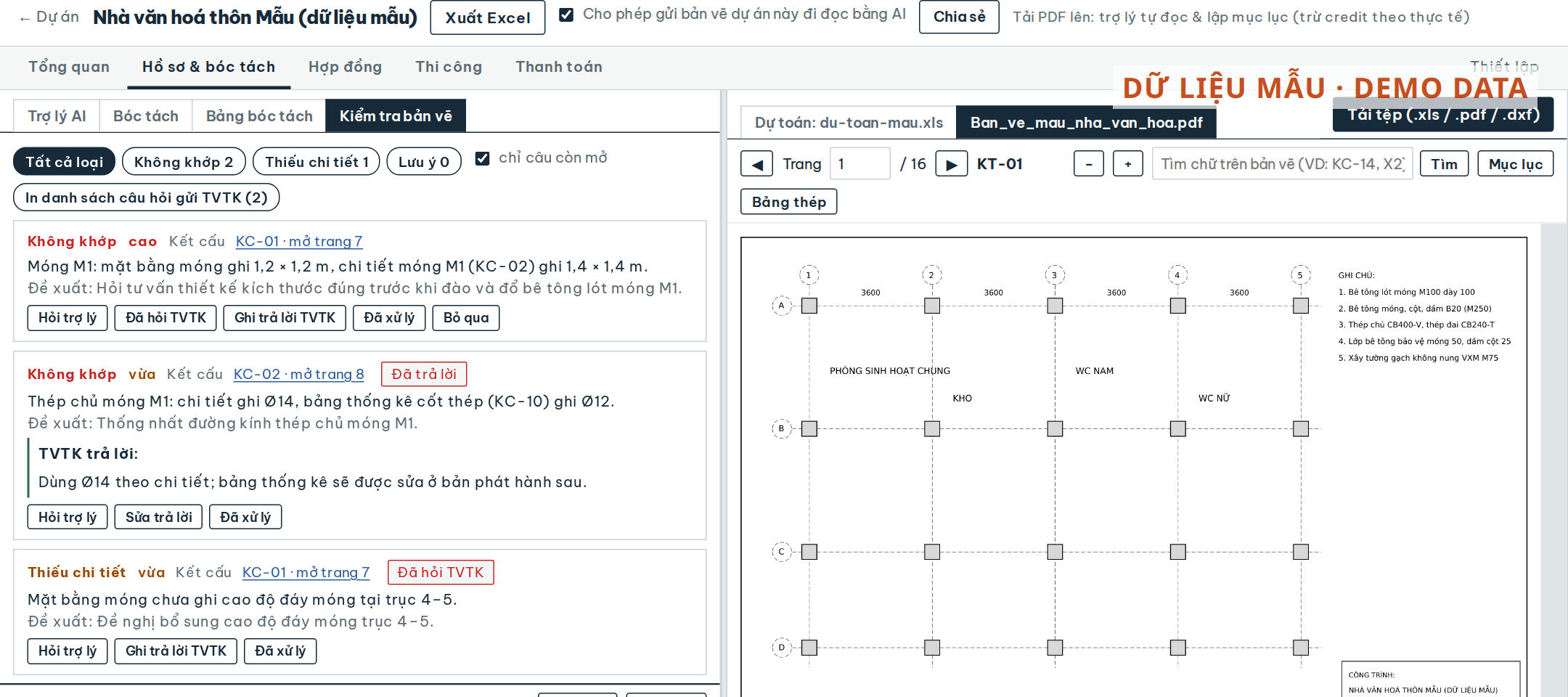
How to measure it. Go through the correspondence with the design consultant on a finished project: how many questions, how many answered after the date that item started, and of those, how many needed a fix.
How far to trust it: low — the softest stream, and the largest in the example. One rework can be a few hundred thousand or a few hundred million VND. Set the two shares equal and the total is still 2.64 million VND a month.
4. The third stream: time to find out where a project stands
Before the site meeting, before reporting to the director, before the client calls: someone opens the schedule, the acceptance register, the payment file, the diary, and adds it up in their head.
How to measure it. For one week, note every time someone has to answer "where is project X" and how long it took.
How far to trust it: high, and small. This is not the reason to make the change; it is only the most visible part.
5. What to subtract
The Overview, the phase rail, the question life cycle and the drawing links use no AI, so there is no model cost. Confirming the quantity links is not a new cost: a record that is to carry money needs it anyway — the change only stops it being forgotten. Questions to the assistant do cost: credit is charged for what the assistant actually reads, for example 2,910 VND for one question counting records. Ten such questions a month come to about 29 thousand VND, roughly a twentieth of the smallest stream below, so the calculator leaves them out.
6. Adding it up
| Stream | Money/month | Trust |
|---|---|---|
| Carrying cost of the stuck money | 2.07 M | fair |
| Rework from unanswered drawing questions | 3.20 M | low |
| Time to find out where a project stands | 0.57 M | high |
| Total | 5.84 M |
About 5.8 million VND a month, 70 million a year for a company building two 5-billion projects. More than half of it is in the softest stream. Drop that stream entirely and what remains — 2.6 million a month — stands on numbers you can count.
The number that is not in the table. On the project in the opening, all of the accepted value is waiting for one confirmation step — the stuck share is 100%, not 28%. Put 100% into the field "share of accepted value whose quantity link is still a suggestion" in the calculator and read again; the example does not use it because it is one case, not an average.
7. What this ROI stands on
The screen only says it; people still have to act. The Overview knows 798 links are still suggestions; it does not confirm them, and it should not — a wrong link joined to a record is a wrong number printed neatly. If nobody reads «Cần làm», the "one screen" days equal today's and the first stream goes to zero.
A question only follows its sheet when the sheet code matches. "Drawing no." on a job is typed by hand. "KC-01", "kc 1", "KC.01" count as one; "Footing axis A" matches no sheet, and then it shows as plain text — no dead link, and no flag either.
The tolerance belongs to the client, not to the software. The default is 5%; change it in each package's Settings. The «chỉ dòng lệch» filter is only useful when that threshold is the one the person approving payments actually uses.
Re-running the drawing check replaces the question list. A new check run produces a new list; the states and the design consultant's answers from the old run are not carried over yet. Close the old run's questions before running a new one.
8. Measure it in your own company
- Take a baseline. The last three payment claims: which items slipped a period and why. The correspondence with the design consultant: which answers came after the item started. One week: how many times, and how many minutes, to answer "where does the project stand".
- Run one project for one month. Each week, note the «Cần làm» lines that appear and the day they go away; the drawing questions by state; the jobs flagged ⚠ that started while the question was still open.
- Compare like with like. A footing month has more drawing questions than a finishing month; compare footings with footings.
9. What to remember
A project does not break inside a phase; it breaks where two phases join. Records complete, contract complete, plan complete — and zero money. When every phase is on one screen and that screen says which joint is still open, what breaks stops being something people discover on the day the payment claim is put together.
Every screen being right does not make the project right. It is right when a number travels from the drawing to the payment period without anyone copying it again.
The 288 acceptance records, the 798 links still suggested, the 490/784 contract lines not in the plan, the 42% planned to date and the 2,910 VND for one question counting records were measured on a real project using the tool, anonymised. The number of projects, contract values, days, shares, rework cost and every assumption in the calculator are illustrative. Replace them with your own.
Read next
-
Never invoice twice: ask the accounting ledger before creating — 199 of 209 invoices were already there
When invoicing moves from the accounting package into the ERP, there is a stretch when both create invoices. If the ERP asks the accounting ledger before it creates one, how many duplicates does a cutover avoid — and what is each duplicate you never clean up worth?
-
Sharing an estimate by one link: what the mailed-Excel loop costs, and "which version is the latest?"
An estimate passes through 2–4 people as Excel files sent by mail, so someone always asks "which version is the latest?". When the whole set — drawings, quantity table, where every number comes from — sits behind one shared project, with people invited by email or sent a view-only link that needs no account, how many hours a month does the review loop get back?
-
Invoicing at the original PO price: the delivery note says 21,000, the chain's PO says 30,000
A retail chain pays the price on its own PO, not the price on the supplier's delivery note. When a machine reads the PO price, invoices at it when the gap is plausible and corrects the price list for next time, what is that worth a month — and which lines still need a person?