Measuring the value
A G8 file from the work items you already have: how many hours of re-typing it saves, and how many copying typos stop reaching the estimate
Quantities worked out in your own sheet, then every code and every explanation line typed again into the G8 estimating program: a few hours a month, and a few copying typos along with them. When an assistant writes the work items as one file in the import layout of G8 2020's «Công trình» sheet — explanation lines as formulas, group and section total rows — how many hours come back, how many typos go away, and how much AI cost comes off?
How many hours does re-typing into G8 cost, and how many typos reach the estimate?
All it needs is how many work items you move into G8 a month, explanation lines per item, an hourly cost and what one typo that gets out costs you. Keystrokes, questions and the odds of a typo follow from them. Everything is editable.
Derived from the four numbers above (per month)
Assumptions — open to see and edit each one
Typing
Copying errors
Asking the assistant
This is an estimate, not a promise. Line B is the softest — set the two error rates equal and read again. Set the share fixed by hand to 100% and the minutes and cost per question to 0: every line goes to 0. An honest model has to do that.
Many estimating engineers do not take off quantities inside their estimating software. They do it in a separate spreadsheet — a few take-off lines per work item, of the form «Móng M1: 1*2,39*1,91*1,44» — then open G8 (Dự toán G8, a Vietnamese estimating program) and type it all again: the code, the item name, the unit, then each take-off line with its count, length, width and height. 150 work items a month at 4 lines each is 750 entries; at 45 seconds an item and 25 seconds a line, about 6 hours.
And retyping is copying. A 2,39 that becomes 2,93 makes no table raise an error: the multiplication still gives a number, the quantities still add up, the estimate still prints beautifully.
This piece asks: if the list of work items you already have were written into a file that G8 imports directly, how many hours of typing would come back, how many copying errors would stop getting into the estimate — and how much AI cost has to be subtracted to get that file?
1. What changes
In a project in the Xây dựng G20 tool, the engineer asks the assistant: "make a G8 file for these work items" — pasting the
list into the question, or pointing at items in an estimate already uploaded. The assistant writes an .xls file in exactly
the layout of the «Công trình» (Project) sheet of G8 version 2020 — the import layout that the G8 2020 installation
itself defines: the first work item on row 6, column C the norm code, column F the item name and take-off text, column G the
unit, columns H–L count, length, width, height and factor, column P the quantity, Q–T the unit prices, U–X the amounts. The
file can be downloaded right under the answer. In G8: Công trình → Lấy công trình từ Excel → Chọn kiểu sẵn có → «Dự toán
G8 - phiên bản 2020» (Project → Import project from Excel → Choose a predefined layout → "G8 estimate, 2020 version").
Inside the file are formulas the way G8 writes them itself, not just numbers:
- A take-off line with dimensions: line quantity = product of the dimensions.
- Work item quantity =
ROUND(SUM(take-off lines),4). - Amount = quantity × unit price, for each column: materials, auxiliary materials, labour, plant.
- Each group of work items closes with a «Tổng:» (Total:) row, each section with a «Tổng cộng:» (Grand total:) row.
Every formula cell carries its computed result, and the file is marked "recalculate on open": a program that does not calculate still reads the numbers, a program that does calculate gets live formulas. Change one dimension and the quantity and the amounts follow.
Two things the file does not do: it does not accept a work item without a code (the assistant looks the code up in the norm dictionary of Circular 38/2026 (TT 38/2026), takes it from the project's estimate or uses the code the engineer gives — it does not invent one), and it does not fill in unit prices on its own: the unit price cells hold only what the engineer provides.
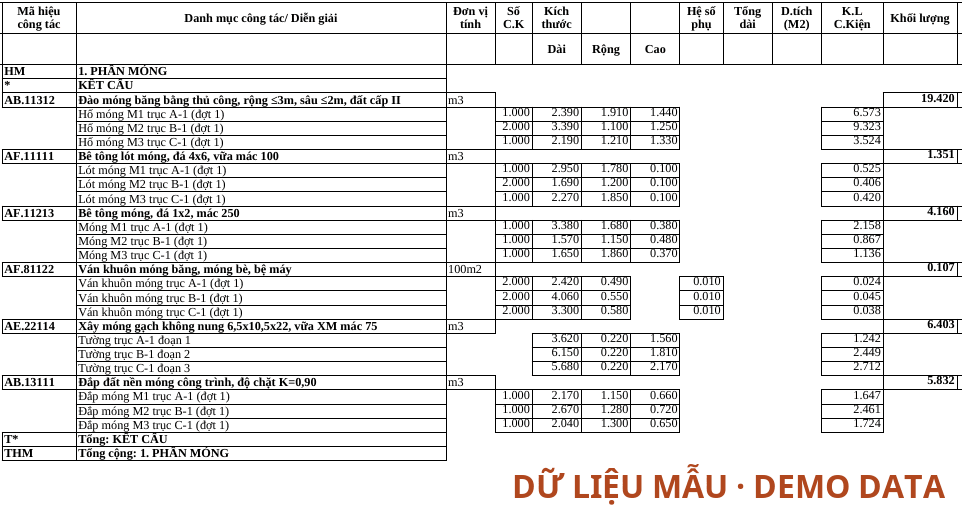
How it was checked. With the same real 263-item estimate as in the piece checking an estimate's arithmetic in one pass: the original G8 file was read, rewritten in this layout, then read back with the very reader used for real G8 files. 263 work items, 1,340 take-off lines and 67 heading rows came back exactly as they were; the file holds 1,435 formulas, and the totals of the four sections equal G8's own totals to the last dong. To be sure the formulas really calculate rather than merely carry stored numbers, we deleted every stored result and opened the file in LibreOffice running without a display: all 1,435 cells recalculated to the right numbers. Importing into G8 itself has not been tried here — G8 runs on Windows.
2. First stream: hours of retyping
How to measure it. Time one round of typing a section into G8, and count its work items and lines. Divide to get the seconds per entry.
How far to trust it: fairly, for the typing. The "still fixed by hand" share has not been measured by anyone — it can only come from your own trial run.
3. Second stream: copying errors that no longer get through
A copying error in a submitted estimate is not just one wrong number: it means correcting, reprinting, resending, and sometimes explaining. It is rare per number and common over a month — which is why the chart at the top of the piece draws the whole distribution: the probability of 0, 1, 2… errors getting through in a month, not just an average.
How to measure it. Go back through your three most recent estimates: how many times did one have to be corrected and resent because of a mistyped number, and what did each time cost?
How far to trust it: low — the softest stream. The file-writing step copies exactly what it receives (the 1,340-line check above). But the figure of 1 error per 1,000 for the lines the assistant copies from the question is an assumption, not measured. Set it equal to the typing rate and this stream goes to 0. The cheapest way to check for yourself: compare each work item's total quantity in the file with your spreadsheet before importing.
4. To subtract: the AI cost
Each question deducts credit according to what the assistant actually reads. On the live service, four questions ending in a G8 file cost from 32,508 to 78,852 VND each. The cheapest called exactly one task, writing the file; the most expensive looked up a batch of norm codes before writing. A question that has to open the drawings to find numbers costs more — that is measured separately in the piece ask the project, answers with sources. Example: 5 questions × 32,500 VND = 162.5 thousand VND/month.
5. Adding it up
| Stream | Per month | Per year |
|---|---|---|
| Hours of retyping (5.0 hours) | 502 thousand | 6.03 m |
| Copying errors that no longer get through (0.81 errors) | 405 thousand | 4.86 m |
| AI cost (5 questions) | −163 thousand | −1.95 m |
| Net | 745 thousand | 8.94 m |
Count it once. These five hours are money or the capacity to do one more estimate. Never both.
6. What this ROI stands on
The list of work items already exists in a copyable form. A spreadsheet, a text — something that can be pasted into a question. If the quantities are still on paper, there is nothing to paste: set the number of work items to 0 and every stream goes to 0.
A question holds at most 8,000 characters. That means section by section, not the whole estimate at once. The smaller the batch, the heavier the minutes and money per question: with the numbers in the example, below about 6–7 work items per question the cost of asking eats all of the saving — below about 11 if the copying-error stream is left out.
Units are your job. G8 takes quantities in the unit of the code — 100 m², tonnes. The file-writing step does not convert units on its own: a take-off line measured in m² for a code priced per 100 m² must carry a factor of 0.01, like the formwork line in the screenshot. Those are the lines to reread first.
Codes still need a person to confirm them. The assistant looks them up in the norm dictionary, but a wrong code is a wrong unit price once it is in G8.
Stored results can be off by one ten-thousandth. In the sample file in the screenshot, one work item has lines adding up to exactly 1,35065: the stored result says 1,3506, while recalculation gives 1,3507 — a difference of about 120 dong in that item's amount. A program that recalculates on open corrects it itself; a program that only reads stored numbers sees 1,3506.
Importing into G8 has not been tried here. The layout follows G8's own definition and matches a real G8 file column by column, but your first import is the real test. Do it with a small section.
The assistant only works for a signed-up account with an AI plan; its cost is already in section 4.
7. Measuring it in your own company
- Take a baseline. Time one round of typing a section into G8. Count the corrections made for mistyped numbers in your three most recent estimates.
- Run one section through the file. Note: the minutes from pasting to finished import, the number of lines fixed by hand, whether the total quantities match the spreadsheet, and the cost of the question.
- Compare like with like. A foundations section with many take-off lines differs from a finishes section with few; compare similar things.
8. What to remember
Retyping is copying, and copying goes wrong at a rate, not according to how careful you are. The most careful person still has a rate; what can change is how many times things have to be typed.
A number that has been typed once should not have to be typed a second time.
The file layout, the formulas, the refusal of work items without a code and the absence of unit conversion are described as they stand in the Xây dựng G20 tool at the time of writing. The counts of work items, take-off lines, headings and formulas, and the section totals, were measured on one real estimate, anonymised; the cost of the four questions was measured on the live service; the file in the screenshot was made from sample data. The work items per month, seconds per entry, error rate, share caught in review, share of lines fixed by hand, cost of one error and salary are illustrative. Replace them with your own.
Read next
-
One photo of the day's delivery list: 462 printed cells, 13 handwritten numbers, the machine sure of 1
A driver photographs one printed list for the whole day; the AI looks for hand marks on the grid and the machine compares handwritten numbers with delivered quantities. Two live days: 10 lists, 13 handwritten numbers, the machine certain of 1 — the value lies in putting the right cells in front of a person, and this is how to price it.
-
Never invoice twice: ask the accounting ledger before creating — 199 of 209 invoices were already there
When invoicing moves from the accounting package into the ERP, there is a stretch when both create invoices. If the ERP asks the accounting ledger before it creates one, how many duplicates does a cutover avoid — and what is each duplicate you never clean up worth?
-
Sharing an estimate by one link: what the mailed-Excel loop costs, and "which version is the latest?"
An estimate passes through 2–4 people as Excel files sent by mail, so someone always asks "which version is the latest?". When the whole set — drawings, quantity table, where every number comes from — sits behind one shared project, with people invited by email or sent a view-only link that needs no account, how many hours a month does the review loop get back?